Worktrees
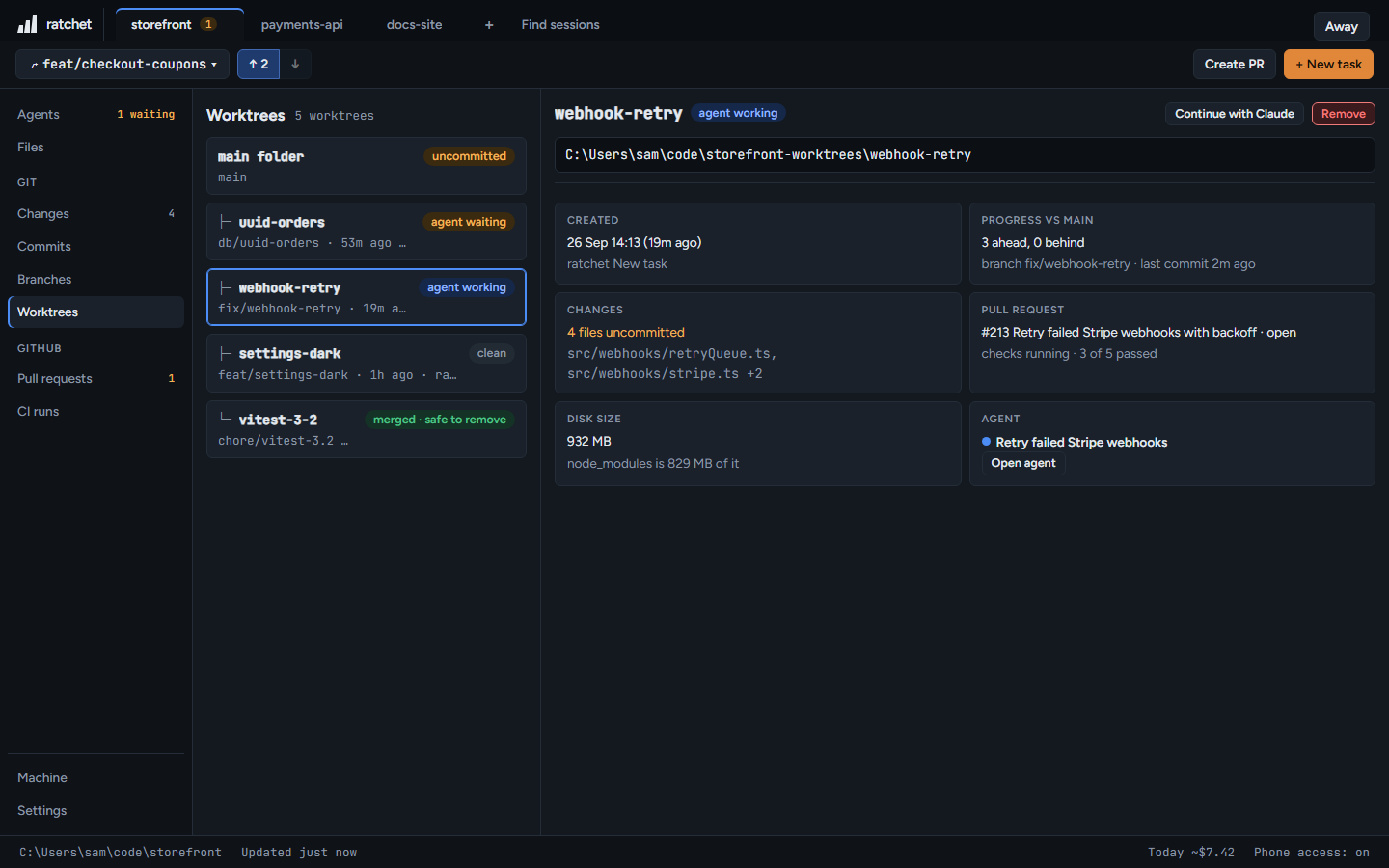
Parallel copies of the repo, one per task. ratchet shows what's in each one and whether it's safe to remove.
Status chips
Each worktree shows one of: agent working, agent waiting, uncommitted, merged · safe to remove, folder missing, or clean.
Details
- Created: when, and how: by ratchet's New task, by Continue with Claude, by a plugin, or by hand.
- Progress: commits ahead of the base branch, and uncommitted changes.
- Pull request: its number and check results.
- Task cost: what every session in this folder has cost so far, helpers included, for example
~$4.20 · 3 sessions. The same figure ends the folder's row. It is an estimate at API prices; see Agents → Task cost. - Disk size: measured every few minutes, with the biggest folder named (usually
node_modules). - Agent: jump to the agent working there.
Remove a worktree
Press Remove. The branch stays. The folder is deleted, including files git ignores, like .env. ratchet refuses while the worktree has uncommitted changes, or while an agent is working or still open in it. Close the agent first, then remove the worktree. The main folder can't be removed.